
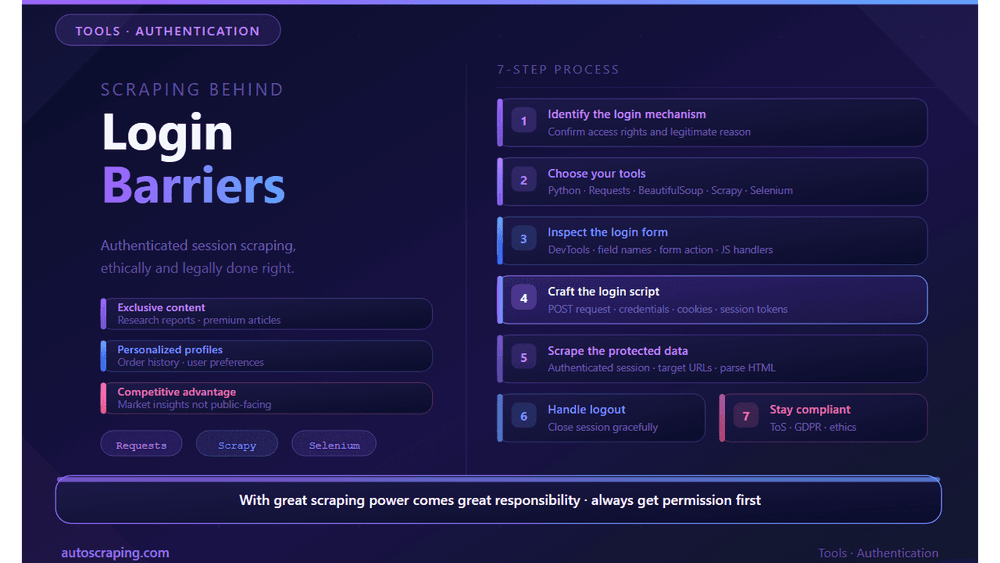
Learn the basics of how to extract data from login barriers
In the realm of web scraping, there often comes a need to access websites that aren't their typical login barriers. While scraping public data is straightforward, extracting data from sites that require authentication is a specialized skill (developed through practice). This guide will walk you through the essentials of navigating authenticated sessions, scraping data, and complying with ethical standards regarding websites that require login credentials, covering down to a variety of action information.
The Context for Protected Data
There are several solid technical arguments of scraping websites that require authentication. It's essential to understand why certain data is behind protected walls and what they mean when it comes to authorization.
1. Exclusive Information:
These often offer the premium of many materials that contain crucial content. Scraping behind the login screen grants access to valuable data, such as research reports, premium articles, or specialized resources.
2. Personalized Profiles:
Websites with user profiles often contain data tailored to individual preferences. Scraping this personalized information can provide context unique to each user's data (e.g., order history, preference settings, or your user experience).
3. Competitive Advantage:
Full businesses and competitive intelligence firms extract protected websites can provide critical data on market insights for pricing, products, or services that aren't available to the general public.
The Path to Scraping Success
Web scraping techniques on authenticated sites consist that requires login information. Here's the step-by-step plan to effectively retrieve information from login-protected websites:
Step 1: Identify the Login Mechanism
Begin by studying the website you want to scrape. Ensure that you have a legitimate reason to access the data (your rights, a legal mandate, or user role).
Step 2: Observe Your Tools
Choose the right tools for the job for your scraping project. Python is a popular choice due to its robust libraries like Requests, BeautifulSoup, Scrapy, and Selenium for web scraping (all of which are open-source).
Step 3: Examine the Login Page
Inspect the login form on the target website using your browser's developer tools. Take note of the HTML structure, field names, form action URL, and any JavaScript code involved in the login process.
Step 4: Craft the Login Script
Develop a script to automate logging into the website. This typically involves:
- Send a GET request to retrieve the login form. It failed (necessary failure or boolean fields from the form).
- Populate the form fields with your login credentials. If, indeed, the form by sending a POST request with the populated fields (cookies, headers, and data) to the server's login endpoint.
Step 5: Scrape the Hidden Data
Once you've successfully logged in (possibly authenticated with a successful login). Make following URL-Scraped data reflecting the successful extraction (data in new session) to create this properly HTML could show data matching the accurately information.
Step 6: Handle Logout (if necessary)
Some websites track active sessions or limit the number of concurrent logins for security reasons. It's often a good idea to tear down sessions gracefully (by logging out).
Step 7: Ethical and Legal Responsibility
It's Web Scraping Legal? The short answer is maybe. But it is necessary to adhere to the website's terms of service, privacy regulations, and ethical scraping practices, which are crucial. Respecting property rights and data protection rights is essential to maintaining the ethical balance in web scraping industry needs.
Always have permission from the website owner or administrator to scrape their protected data (ensure full authority and consent). Before initiating any scraping activities, understand the need for consent and respect data.
To riskier instances of information, their legal approach, local, and ethical considerations, you can explore guides to analysis (and popular pages). But most state private (and) while preventing or discouraging scraping activities (and user data and privacy). Follow them promptly. Other data about scraping (legally/responsibly without).


